DRAFTThis course is not yet published. It is only visible in preview mode.
Mastering 3D sound in music production with Dolby Atmos hero

Creative Coding

Mastering 3D sound in music production with Dolby Atmos

Dolby Atmos is the leader in the growing spatialised sound movement in music. This course, developed in collaboration with Dolby Atmos, will provide you with the latest skills, techniques and first-hand industry insights into the methodology of using Dolby Atmos in commercial music production. Tutor Hugh Neal has 20 years of industry experience, having mixed at top London studios such as Abbey Road and Metropolis, working with renowned artists like James and Paul McCartney. Music Hackspace is proud to be a Dolby Approved Partner

Level

Beginner

Duration

8h 21m of video content

Format

Self-paced video

Course overview

Dolby Atmos is the leader in the growing spatialised sound movement in music. This course, developed in collaboration with Dolby Atmos, will provide you with the latest skills, techniques and first-hand industry insights.

Who is this course for?

  • Engineers, sound designers, and mixers looking to deepen their understanding of Dolby Atmos technology and its applications in various media, including film, music, and home entertainment.
  • Individuals interested in exploring Dolby Atmos for music production, including advanced mixing techniques and creative uses in spatial audio design.
  • Those who work with digital audio workstations (DAWs) like Pro Tools, Logic Pro, Ableton Live, and others, aiming to learn specific workflows and configurations for Dolby Atmos content creation.
  • Professionals focused on the technical aspects of audio production, such as equipment setup, software configuration, and mastering for Dolby Atmos, looking to enhance their skills in setting up and operating Dolby Atmos environments.

Requirements

  • Access to the Dolby Atmos plugin
  • Access to the Dolby Atmos Assembler Software
  • Good quality headphones

Course content

1. Introduction to Dolby Atmos (LIVE)

1 video, 5 lessons

+
  • Introduction To Dolby Atmos (Session Recording)
    Checking access...
  • Overview of Dolby Atmos: History, development, and significance in audio technology.
  • Basic Concepts: Understanding 3D audio, surround sound vs. Dolby Atmos.
  • Dolby Atmos in Film and Music: Differences in application.
  • Applications: Cinematic, home entertainment, and music production.
  • Interactive Discussion: Q&A on the basic concepts.

2. Dolby Atmos Core Concepts (Self-Paced)

7 lessons

+
  • Dolby Atmos Basics
  • Dolby Atmos Renderer Functions and Concepts
  • Dolby Atmos Content Creation Signal Flow
  • Dolby Atmos Renderer Configurations - DAWs with Integrated Dolby Atmos Functionality
  • Dolby Atmos Renderer Application running on the Same Mac Workstation as the DAW
  • Additional Components of a Dolby Atmos Content Creation Studio
  • DAW Configuration for Dolby Atmos Workflows

3. Technical Foundations of Dolby Atmos (LIVE)

1 video, 5 lessons

+
  • Technical Foundations of Dolby Atmos (Session Recording)
    Checking access...
  • Room Requirements: Fundamental room requirements and speaker placement.
  • Technical Specifications: Channel-based audio vs. object-based audio.
  • Dolby Atmos in Film and Music: Differences in application.
  • Dolby Atmos Tools: Introduction to software and hardware requirements.
  • Case Study Analysis: Examining existing Dolby Atmos projects.

4. Dolby Atmos Renderer: Initial Operation (Self-Paced)

5 lessons

+
  • Installer Components and Other Tools
  • Renderer Window Overview
  • Initial Configuration using the Dolby Audio Bridge
  • Initial Configuration using a Dedicated Atmos Renderer Workstation
  • Basic Renderer Operations

5. Dolby Atmos Mixing Techniques I

1 video, 4 lessons

+
  • Dolby Atmos Mixing Techniques I (Session Recording)
    Checking access...
  • Mixing Concepts: Understanding the Dolby Atmos mixing pane.
  • Spatial Audio Design: Techniques for placing sounds in 3D space.
  • Hands-on Practice: Basic mixing exercise with provided audio samples.
  • Group Discussion: Sharing experiences and troubleshooting.

6. Dolby Atmos Renderer: Additional Functions (Self-Paced)

6 lessons

+
  • Input Configuration
  • Re-renders
  • Trim and Downmix Controls
  • Binaural Render Mode
  • Exporting and Importing Input/Binaural/Re-render Configuration Files
  • MP4 Export

7. Dolby Atmos Mixing Techniques II (LIVE)

4 lessons

+
  • Mixing Concepts: Continual understanding the Dolby Atmos mixing pane.
  • Organising mix stems to correlate to a stereo master counterpart.
  • Setting up stem based mixing options to enable sonic parity to a stereo master.
  • Group Discussion: Sharing experiences and troubleshooting.

8. Using Pro Tools for Dolby Atmos Content Creation (Self-Paced)

9 lessons

+
  • Pro Tools - Establishing Communication with the Dolby Atmos Renderer
  • Pro Tools - Audio Output Routing, Bussing, and Bed and Object Mapping
  • Pro Tools - Assigning Audio Tracks to Beds and Objects
  • Pro Tools - Using the Supplied Templates
  • Pro Tools - Synchronizing Pro Tools and the Dolby Atmos Renderer
  • Pro Tools - Single and Multiple Bed Configurations
  • Pro Tools - Groups and VCAs
  • Pro Tools - Bouncing a Mix to ADM BWF and Re-renders
  • Pro Tools - Using the Dolby Atmos Music Panner

9. Advanced Dolby Atmos Production (LIVE)

5 lessons

+
  • Zoom link - Monday 24th Feb
  • Advanced Mixing Techniques: In-depth exploration of Dolby Atmos tools.
  • Creative Uses: Dolby Music Panner vs Object Automation.
  • Project Work: Starting a small project that can be used for the final assessment submission.
  • Feedback Session: Discussing project ideas and potential challenges.

10. Using Other DAWs for Dolby Atmos Content Creation (Self-Paced)

5 lessons

+
  • Ableton Live using the Dolby Atmos Music Panner
  • Apple Logic Pro using the Integrated Atmos Renderer
  • Apple Logic Pro using the Dolby Atmos Music Panner
  • Blackmagic Design DaVinci Resolve Studio
  • Steinberg Nuendo and Cubase

11. Finalizing and Exporting Dolby Atmos Projects (LIVE)

6 lessons

+
  • Zoom link - 3rd of March
  • Introduction to the Dolby Atmos Assembler Software.
  • Mastering for Dolby Atmos: Best practices for finalizing projects.
  • Export Formats: Understanding different distribution formats.
  • Project Completion: Finalizing the projects started in Session 5.
  • Final Presentation and Review: Sharing and reviewing completed projects.

12. Dolby Atmos Music Focused Exercises (Self-Paced)

15 lessons

+
  • Pro Tools Exercise 1 - Playback from Pro Tools and Monitoring the Renderer Input
  • Pro Tools Exercise 2 - Pro Tools and Renderer Monitoring Options
  • Pro Tools Exercise 3 - Create and Playback a Dolby Atmos Master File
  • Pro Tools Exercise 4 – Mixing in Dolby Atmos, Assign Tracks to Groups and VCAs
  • Pro Tools Exercise 5 - Using VCAs to Mix to a Target Loudness Level and Exporting Re-renders
  • Pro Tools Exercise 6 - Using the Dolby Atmos Music Panner
  • Logic Pro Exercise 1 - Setting up a Project in Logic Pro Using the Integrated Dolby Atmos Workflow
  • Logic Pro Exercise 2 - Setting up a Project in Logic Pro and the Dolby Atmos Renderer
  • Logic Pro Exercise 3 - Recording a Dolby Atmos Master
  • Logic Pro Exercise 4 - Creating a Dolby Atmos Mix
  • Logic Pro Exercise 5 - Loudness and Exports
  • Ableton Live Exercise 1 - Configuring an Ableton Live Set and the Dolby Atmos Renderer
  • Ableton Live Exercise 2 - Recording a Dolby Atmos Master
  • Ableton Live Exercise 3 - Creating a Dolby Atmos Mix
  • Ableton Live Exercise 4 - Loudness and Exports

13. Review of the exercise (LIVE)

5 lessons

+
  • Zoom link - 10th of March
  • Listening exercise
  • Group review
  • Best practices for mixing in Pro Tools
  • Q&A

14. Dolby Atmos Post-Production Focused Exercises (Self-Paced)

7 lessons

+
  • Pro Tools Exercise 1 - Playback from Pro Tools and Monitoring the Renderer Input
  • Pro Tools Exercise 2 – ADM BWF Import to Pro Tools and Renderer Monitoring Operations
  • Pro Tools Exercise 4 – Configuring Pro Tools and the Renderer for Multiple Bed Workflow
  • Pro Tools Exercise 5 – Combine Select Tracks from ADM BWF Files, Assign Tracks to Groups and VCAs
  • Pro Tools Exercise 6 – Using VCAs to Mix to a Target Loudness Level
  • Pro Tools Exercise 7 – Creating Deliverables
  • Pro Tools Exercise 8 – Using the Dolby Atmos Music Panner

15. Final guided lab (LIVE)

5 lessons

+
  • Zoom link - 17th of March
  • Listening exercise
  • Group review
  • Best practices for mixing in Pro Tools
  • Q&A

Instructors

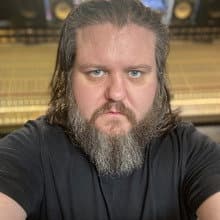
Hugh Neal

Hugh Neal

Instructor

Hugh Neal brings over 20 years of professional experience in the music industry as a session musician, producer, engineer, and mix engineer. He has performed globally and worked in top London studios such as Abbey Road and Metropolis. Specialising in Dolby Atmos Mixing, Hugh built the Dolby-certified "Friary Studio B" and collaborates with leading audio companies to stay at the cutting edge of the industry. Hugh has worked with renowned artists like Paul McCartney and producers such as David Kahn. He is an approved UMG Dolby Atmos global engineer. With over 15 years in music education, Hugh has taught at prestigious institutions, including BIMM Institute London, where he led music technology modules. His extensive industry experience and educational background make him an ideal tutor for a professional Dolby Atmos course.

Ready to join?

One-off enrolment. Includes all course materials.